What is RuneFrame?
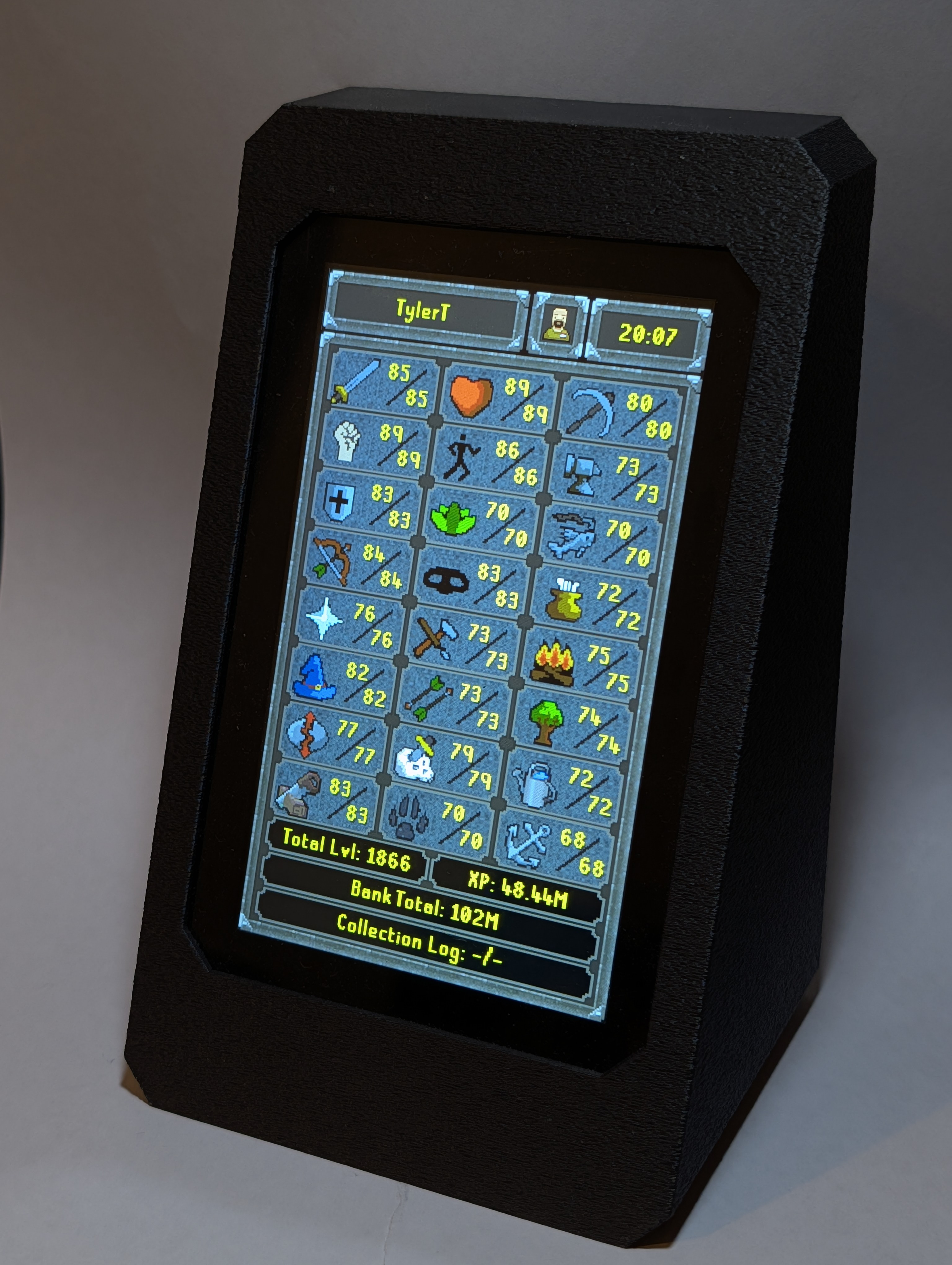
RuneFrame is a low-profile desktop hardware display powered by an ESP32-S3. Connected via a custom RuneLite plugin, it tracks your character stats in real-time outside the game window.
- Real-Time Skill Tracking: Monitor your live skill levels, XP milestones, and progress to max.
- Level-Up Notifications: Catch every milestone with custom on-screen pop-up alerts the moment you level up a skill.
- Comprehensive Account Stats: Keep track of your quests, combat tasks, collection log, and total bank value at a glance.
- Seamless Updates: Easily download new features directly to the device over Wi-Fi with one tap.
Everything RuneFrame Can Do
Click to expand each section to learn more about the features.
Live Skill and XP Tracking
Select any two skills to feature on the main display using the on-device touch menu. As you gain XP in-game, the screen instantly updates with your current level, total XP, and a visual progress bar indicating how close you are to your next level.
In-Game Event Overlays
RuneFrame bridges the gap between the physical and digital world. When you level up a skill in Old School RuneScape, a custom overlay immediately pops up on the physical hardware screen to celebrate the milestone, just like the in-game fireworks.
Account Progress Tracking
Keep a permanent eye on your long-term goals. The device pulls directly from the Screen of Knowledge to display your current Quest Point total, Combat Achievement completions, Achievement Diary progress, and unique Collection Log slots unlocked.
Bank Value and Wealth
Watch your bank grow without needing to keep a tab open. RuneFrame securely calculates and displays your total bank value based on live Grand Exchange prices updated directly through the RuneLite client.
Native Touch Configuration
No messy computer software or command line tools needed to set up your device. Enter configuration mode right on the touchscreen to connect to your home Wi-Fi network, pair your RuneLite account, and adjust your active skill targets using a custom on-screen keyboard.
Over-The-Air (OTA) Updates
RuneFrame receives software updates wirelessly. Just open the System Update menu on the device, check for the latest version, and install new features or bug fixes directly over your Wi-Fi connection without needing to plug it into a computer.
How to Get a RuneFrame
Choose the path that fits your setup style:
Option 1: Complete DIY
- Join Patreon to access 3D print files and the hardware shopping list.
- Print the case and purchase components separately.
- Assemble the hardware and use our web tool to load the software.
Option 2: Hardware Kit
- Order a pre-packaged hardware kit containing all electronics and a 3D printed case.
- Plug the kit into your computer via USB.
- Join Patreon to access our web tool and install the software.
Support on Patreon
Directly fund future firmware updates and hardware development. Membership unlocks all digital build assets:
- Complete 3D Print Files for the custom case
- Direct component sourcing links
- Step-by-step assembly guides
- Access to the One-Click Web Flasher and Over-The-Air Updates
Supporter Flash and Update Tool
Already a Patreon supporter? Enter your access code below to unlock the secure installer tool. Not a member yet? Join Patreon.